Over the last year, TX2500 users from all over the world contacted us with their reviews. For the most part, users praised the Tx2000 series as a great Tablet.
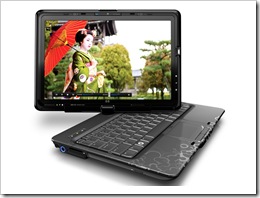 However, on occasions we have heard complaints of excessive heat and fan noise.
Take for example some comments from our Tx2000 post on this blog:
Webmonkey: “Fan noise; seems to vary for no apparent reason, even when idle reading a webpage.”
MEDA CALDERON: “My problem is the fan noise….as i open the laptop the noise at the fan doesn’t stop until i put it off… What should I do?”
Joachim Schneider: “If you’re in a loud environment, it’s a great laptop. The build-in speakers sure can overcome the fan noise. But if you need it quiet, get something else.”
On the other hand, Tablet PC review reported that heat was a problem, but were less scathing about it:
Heat and Noise
The tx2500 does tend to get warm, especially when running benchmarks or working hard. I didn’t notice much heat when browsing the Web or going through emails, but the bottom does get a little warm. When the tablet is running multiple applications or benchmarks the fan kicks on and the heat comes blowing out the vent and it is hot to the touch. This is after a few hours of being on though. I didn’t notice any part of the tablet to be so warm it was uncomfortable though, except for the bottom under extreme working conditions.
I didn’t notice any noise from the tx2500 either. The only time the tablet was noisy was when I ran benchmarks and that is when the fan kicked on high. It was annoying and sounded like a hair dryer. Besides that the fan didn’t kick on much and even when it ran on a low setting it was quiet.
The heat generation on this unit is undoubtedly linked directly to the AMD Turion processor. Whilst it is a great mobile processor, it doesn’t compete with the power saving performance properties of Intel low voltage Centrino Core 2 Duo processors found in higher end Tablet PCs.
In this case, power consumption results in heat generation, and therefore fan noise.
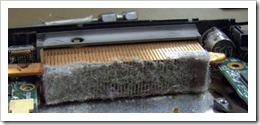 Fortunately HP have published some advice for those who want to keep their TX tablets quiet.
According to HP:
The electrical components in a PC generate heat, and fans inside the PC help move the air to keep the components cooled to normal operating temperatures.
Inadequate cooling can cause excess heat which forces the fan to run constantly, can damage components, and limit the speed of the CPU. All of these problems with high power and high heat will cause applications to work slower than normal.
So, if you want to have a go at cleaning your HP Tx series to keep it running fast and quiet, check out this article on the HP website.








Tried the link from the HP site and it turned up as unfound.
Thanks Kevin. Added the http:// to the link. Should work for you now.
Regards,
Brett
Hi Tablet PC.
I’m own a TX2020eo laptop.
In your article you write following:
“The heat generation on this unit is undoubtedly linked directly to the AMD Turion processor. Whilst it is a great mobile processor, it doesn’t compete with the power saving performance properties of Intel low voltage Centrino Core 2 Duo processors found in higher end Tablet PCs.”
I’m not sure i can agree on that.
When the guarantie ran out on my laptop, I decided to take it apart to find out about the heat problem.
First of all, the thermal grease is the worst crap ever. Second of all its not the CPU but the GPU which are making the extreme heat in the tx2000 series.
Instead of thermal grease they have chosen to use thermal pads on the GPU, and because of a large gap you cant fill it out with thermal grease.
Second of all HP have chosen to put 2 different metal types together to make the cooler, and thats where it fails.
I hope you understand my poor english but I’m from denmark and I’m only good at talking, not at typing.
I know this is almost a year since this article was made, but rather sooner than later. If you got any questions then contact me on my mail and I’ll try to explain.
– Theis
Thank you for your insight Theis. I stand corrected on this. It’s a shame that this problem is so basic and yet there have been so many iterations of this machine that you would think that HP would have resolved it!
Will be interested to see how the new model performs with regard to heat.
Your welcome..
I doubt that HP does anything about it before its to late..
I had contact with HP Care center and all they did about my problem was to update the bios, wuhu no changes at all.
But as long as HP does make a midway solution on their cooling solutions i doubt the pc’s will be anywhere near cool.
I’m pretty sure about my next buy is gonna be a macbook pro insted and buy some software i read about where you can use the trackpad as a tablet. It may not work as well as a dedicated tablet pc, but for my needs it works just fine 🙂
– Cheers
Same problem on my HP Pavillion tx2120us. I found on YouTube http://www.youtube.com/watch?v=ctHTF3oNdxI where they reflowed the solder on the GPU and inserted a copper penny to close the gap problem. I’m going to try this and let you know what happens. : )